[TCC] Automatic caption generation for BRSET
This post covers how we generated captions that describe each image in BRSET, according to three caption types: anatomical, diseases and quality.
We have previously defined that I will be training two deep learning models, CLIP and SIGLIP, and use these models to make retinal images retrieval from natural language descriptions. However, we do not have data containing captions for these kind of images, that would allow us to actually train these models for this purpose. With that in mind, we needed to get creative with ways to actually be able to deal with the kind of data we have.
In this post, I will cover how I generated captions for the retinal images in BRSET, while joining the dataset annotations and my previous research results.
Important References
It may feel a little off to have the references section on the beginning of a text, but in this case, we should have access to a few things before we start to explain the decisions we made while generating the dataset. Follow the links to find information:
With that in mind, we can follow to the rest of the post.
Understanding BRSET beyond the basics
We have previously worked with BRSET, but never really explored all the dataset information that may have usual information. However, now we want to generate captions describing each image, so we would really try to explore the most out of the dataset. We created the data-generation.ipynb notebook, in which we led a simple yet extensive exploration in BRSET. This exploration, combined with actually taking the time to read further the BRSET paper, actually gave us a better knowledge of everything we needed. We also had the idea of using our previously trained YOLO detection models for macula and optic disc to gather more information on the images. Given this context and the data we had available, we came up with the idea of having three captions for each BRSET image: one for image quality, one for anatomical features, one for disease analysis.
Understanding this context, we now need to understand how to leverage the information we have available, what is useful, what is not and so on. Take a look at the following bar plot:
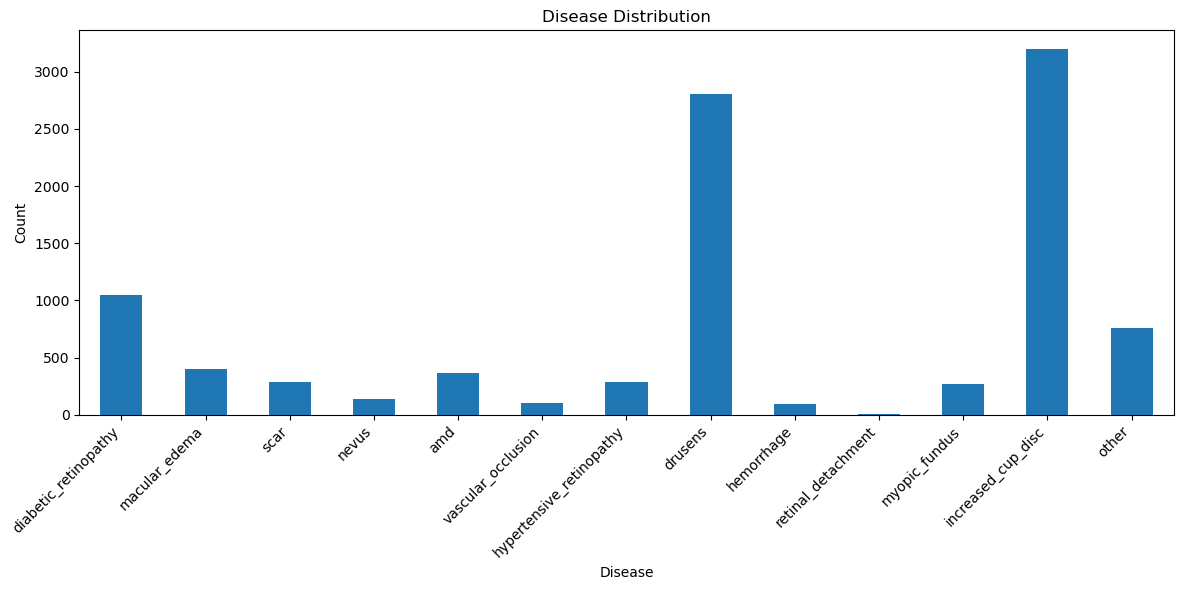 Original diseases distribution in BRSET
This image shows the original diseases distribution in BRSET, meaning how many images present each diseases. However, we do know that many people who present diseases in their retina actually have more than one pathology, condition or anything related that can be present. If we want to train a model that will have better understanding of each disease, we must have only images with a single disease. After removing the ones with more than one disease, this is the distribution we have:
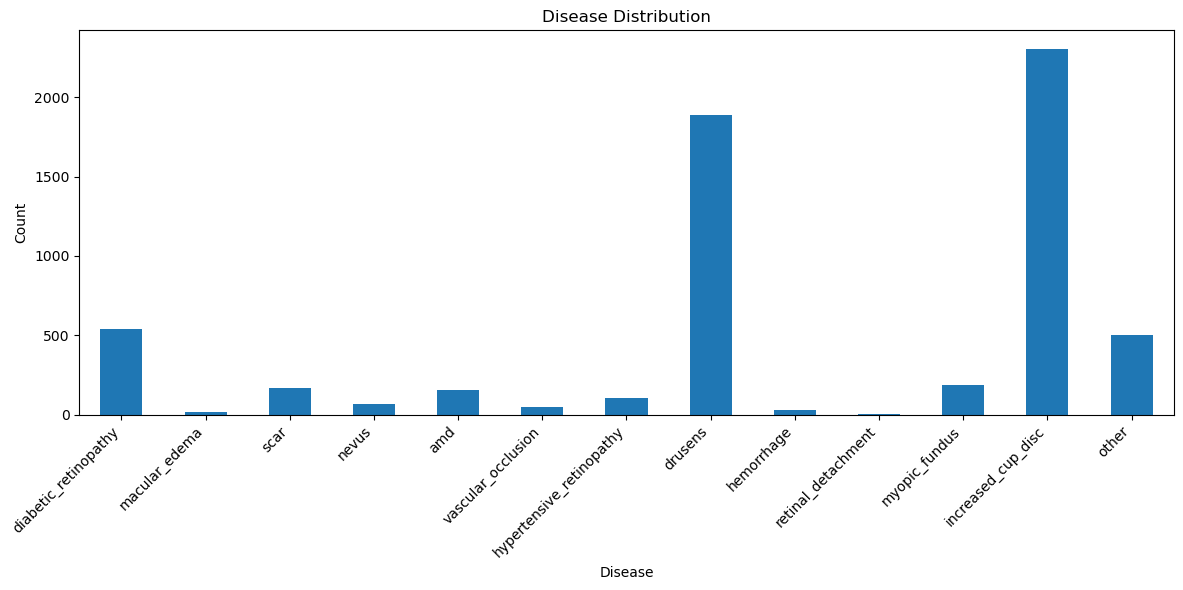 Processed diseases distribution in BRSET
Now, we have a total of 13970 images, out of the 16266 initial ones, and we don’t have a very rich data source for some classes. For instance, the macular edema have very few images, however we want to preserve this class, since we will be using our macula detection model as well, which can be helpful. Other classes, such as the retinal detachment, we can just join in the “other” class, since it is not exactly meaningful.
Having that, we now have enough information from BRSET, from the quality and disease labels, that can be used to generate the captions we want. As a next step, we just need to gather the anatomical information to generate the third caption.
Applying YOLO to gather data signals
We have developed an undergraduate research project, entirely blogged here, to solve an image quality assessment problem present in BRSET. One of the main contributions from this project was joining several public retinal datasets to gather annotations for the retinal optic disc and macular region, and train two YOLO detection models to find these structures in retinal images. The results we obtained from these models were quite impressive, and we decided to leverage that information here. Not only that, we also took advantage of the whole algorithm we developed for that research project, since we had a lot of useful information obtained there
We put together these YOLO models in this project, together with the IQA algorithm, in order to gather important signals for the retinal images, and ran it on the remaining BRSET images. Following, we present a list of the signals we gathered from that project:
| od_detection_confidence | The confidence level of the optic disc detection, by the YOLO model |
|---|---|
| od_center_x | The center coordinate of the optic disc, on the X axis |
| od_center_y | The center coordinate of the disc, on the Y axis |
| od_diameter | The optic disc diameter |
| od_side | In which side of the retina (left/right) is the optic disc located |
| nasal_distance | The distance between the optic disc and the nasal edge of the retina |
| fovea_detection_confidence | The confidence level of the macula detection, by the YOLO model |
| fovea_center_x | The center coordinate of the macula, on the X axis |
| fovea_center_y | The center coordinate of the macula, on the Y axis |
| temporal_distance | The distance between the macula and the temporal edge of the retina |
| fovea_side | In which side of the retina (left/right) is the optic disc located |
| od_fovea_angle_degrees | The angle, in degrees, between the optic disc and the macula |
To have better context on this project at all, you can read my published research paper :)
Generating captions for retinal images with a local LLM
We finally gathered all the information we wanted and we can start to think about how we will get to generate captions for our project. First of all, have in mind we don’t want huge captions for each image. Not only that, each image will have 3 captions, as previously mentioned; one may ask if it is ok to have multiple captions for CLIP and SigLIP models… it is actually recommended! The most famous dataset used for this task is the Coco dataset, which contains 5 captions for each image.
It is quite important now to decide which data we can leverage for this step. I won’t really get in details of that, if someone wishes to see what I choose to use, they can always check the script on the project’s github repository, which is public. Right now I will focus more on describing how the captions were generated.
We are living in the world of AI. Since 2022, when ChatGPT was released, many engineers and researchers have started to embed models into their products, specially language models. We have decided to do that here as well, since we have basic knowledge about the retinal images, the captions we want to generate and the signals we have available to do so. Since there are over 13k images in our final dataset, it would not be viable to actually write the captions by hand, just by analyzing the results, so using a LLM would be the next best thing.
With that in mind, we had two possible approaches:
- Call a LLM API in the codebase
- Run a LLM locally
We chose the latter one. Since we have way too many images, and wanted to generate 3 captions for each, adding up the test scenarios we would run first while tuning our prompt, using the API call approach would start to cost money, which could escalate to a high cost. However, running a LLM locally is not really easy, not all machines are powerful enough to support that, and the most famous models are still paid. To surface those issues, we will be running the models on the Vision network — a computer network used for computer vision assignments, we have on our CS department, used specially for research, that have a few powerful GPUs available. As for spending money to have access to a better model, we did not judge this as necessary at first, since we want to generate simple captions, a good prompt in a simpler model should be enough for our use case.
Our first approach was trying to use Ollama, since it lets us integrate easily LLMs locally into our projects and development environment. However, we do not have sudo permissions to download this in the Vision network, that would make it harder to download. The chosen solution was to integrate the Qwen 2.5 model (with 3B parameters) locally via the hugging face transformers library. Once we adjusted all the packages versions and conflicts, and we got the model to run, we realized that the integration was actually not hard. The way it works is, we define the model and the tokenizer, and the library takes care of downloading the model’s weights on your local machine. Then, you just need to configure:
- A system prompt: it is a fixated prompt that is fed to the model, it has the basic configuration for the model to run, what it should always repeat and also provide model safety. Since our model is locally, we just gave general instructions.
- A prompt: this is the actual prompt, the information that varies in every call to the model.
The following function definition shows an example of how we generated the prompt for the quality caption:
1
2
3
4
5
6
7
8
9
10
11
12
13
14
15
16
17
18
19
20
21
22
23
24
25
26
27
def generate_quality_prompt(row):
    macula_visibility = get_macula_visibility(row['fovea_detection_confidence'])
    focus_information = get_focus_information(row['focus'])
    illumination_information = get_illumination_information(row['iluminaton'])

    prompt = f"""You are an ophthalmology assistant.
        Generate a short sentence describing image quality.
        Focus on:
        - focus
        - illumination
        - visibility of retinal structures
        Do not mention diseases.
        Do not mention anatomy.
        Return only the sentence, no extra texts.
        Try to provide a few variability on how the sentence is produced and how
        you mention macular visibility. You may use similar words for this, such as
        fovea.

        Image findings:
        - macula visibility: {macula_visibility}
        - image focus: {focus_information}
        - image illumination: {illumination_information}.

        Return exactly one sentence.
        """

    return prompt
and then we can actually send this prompt, together with the system prompt, to the model:
1
2
3
4
5
6
7
8
9
10
11
12
13
14
15
16
17
18
19
20
21
22
23
24
25
26
27
def generate_image_caption(prompt, system_prompt, model, tokenizer):
    messages = [
        {"role": "system", "content": system_prompt},
        {"role": "user", "content": prompt}
    ]
    text = tokenizer.apply_chat_template(
        messages,
        tokenize=False,
        add_generation_prompt=True
    )
    model_inputs = tokenizer([text], return_tensors="pt").to(model.device)

    generated_ids = model.generate(
        **model_inputs,
        max_new_tokens=64,
        do_sample=True,
        temperature=1.0,
        top_p=0.95,
        pad_token_id=tokenizer.eos_token_id
    )
    generated_ids = [
        output_ids[len(input_ids):] for input_ids, output_ids in zip(model_inputs.input_ids, generated_ids)
    ]

    response = tokenizer.batch_decode(generated_ids, skip_special_tokens=True)[0].strip()

    return response
For this part of the code, we have defined a max of 64 tokens, to make sure we have a limited response, since the captions we wish to have should not be large. We also reinforce that in the prompt. We also set the temperature to 1.0, together with do_sample=True, allowing to sample the next token from the probability distribution, leaving us with a more diverse set of responses. We also set top_p=0.95, so the model only considers the combinations of tokens that the probability sum would reach top_p. We then decode the response generated and have our labels available and ready to use!
In this post, I will not go through the actual results, since I still need to dig deeper into these and have a conversation with my advisor, however I am already proud of the solution we came up with, which is modern, creative and reflects the path computer science is going through at the moment. Feel free to reach out and give any suggestions to what can be better about this.
Next steps
- Study the literature for multimodal text-image alignment models.
- CLIP.
- SigLIP.
- Study the literature to find how these models are used for medical images.
- How they are currently leveraged in the literature.
- Which metrics are used to evaluate the models performance.
- What are the application goals for these models.
- Adapt dataset for training.
- Analysis of the generated dataset.
- Training and evaluation for CLIP.
- Training and evaluation for SigLIP.
- Results analysis and comparison.
- Code organization for the model training.
- Pre-defined seeds for traning and results reproduction.
- Scalable architecture for ML models training systems.
- Develop tool for search in images databases.
- Make all source code available as an open-source project.
- (Bonus): follow the same development pattern to train a VLM model capable of generating captions for retinal images
This post is used as a checkpoint for my bachelor thesis project: retinal image retrieval pipeline via natural language, supervised by professor Nina S. T. Hirata, from the Institute of Mathematics, Statistics and Computer Science at the University of São Paulo (IME USP).